Have you ever struggled with this: when screen sharing for recording or live streaming, you need to check your script or teleprompter, but don't want to completely block the screen content?
Recently, a user found us through this search: "I need a transparent teleprompter that I can move around on screen and have it scroll at various speeds so I can still see the screen sharing behind the teleprompter app for Windows, or web based not sure"
Today, we're introducing FlowPrompter - the perfect solution that addresses this real user need.
What is a Transparent Teleprompter?
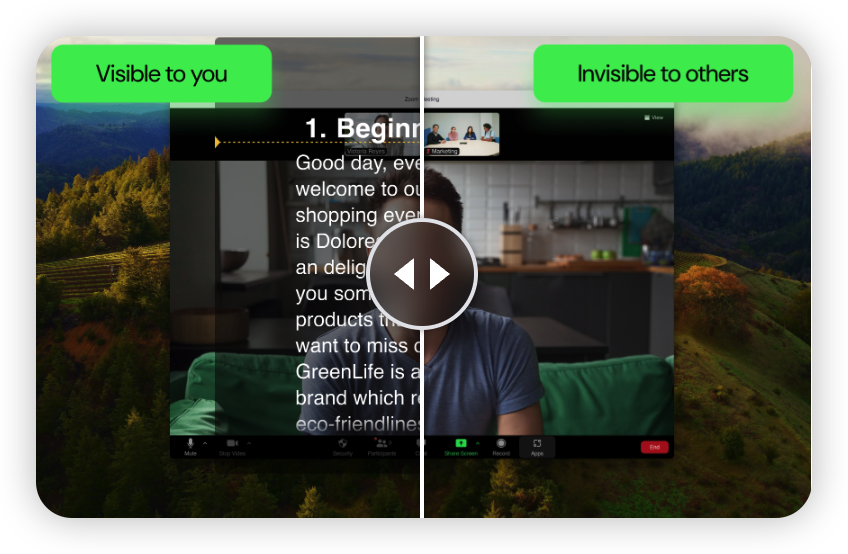
A transparent teleprompter is a special prompting tool with a semi-transparent interface that displays your script without completely blocking the background content. This is particularly useful for scenarios where you need to screen share and view your script simultaneously.
Key advantages:
✅ Transparent Interface: See the screen content behind
✅ Free Movement: Drag to any position on the screen
✅ Adjustable Speed: Multiple scroll speeds for different rhythms
✅ Cross-Platform Support: Windows, Mac, and web-based versions available
Why Choose FlowPrompter?
1. Truly Transparent Experience
FlowPrompter offers adjustable transparency settings, allowing you to customize the teleprompter's opacity based on your needs. This means you can check your script while still clearly seeing the presentation, code editor, or other application interfaces behind it.
2. Flexible Positioning
Unlike traditional teleprompters that only fix in a certain position, FlowPrompter allows you to drag the teleprompter window anywhere on the screen. Whether placing it in the corner, top, bottom, or dynamically adjusting the position based on your presentation needs, it's all easy to achieve.
3. Intelligent Scroll Control
FlowPrompter provides multiple scroll speed options:
Manual Control: Use mouse wheel or touchpad to scroll manually
Auto Scroll: Preset multiple speed levels to choose your best rhythm
Smart Speed Adjustment: Automatically adjusts scroll speed based on your reading speed
Voice Control: Control scrolling through voice commands (advanced feature)
4. Cross-Platform Support
FlowPrompter offers multiple usage methods:
Windows Version
Native Windows application
Supports window mode and opacity adjustment
Perfectly integrated with Windows multitasking
Web-Based Version
No installation needed, use directly in browser
Supports all major browsers (Chrome, Firefox, Safari, Edge)
Cross-platform compatible (Windows, Mac, Linux)
Mobile Version
iOS and Android native applications
Supports phones and tablets
Can be used as an independent teleprompter
Real Use Cases
1. Technical Demo and Tutorial Recording
When demonstrating software operations, you need to explain while operating the application. FlowPrompter's transparent teleprompting feature lets you view your script while still operating, without blocking the application interface being demonstrated.
Typical scenarios:
Software feature demo videos
Programming tutorial videos
Product operation guides
Online course recordings
2. Live Streaming and Online Meetings
When screen sharing for live streaming or online meetings, you can use FlowPrompter to assist with your presentation. The transparent teleprompter allows you to naturally read your script without the audience noticing you're using a teleprompter.
Typical scenarios:
Product launch live streams
Online course live broadcasts
Corporate internal sharing
Webinars
3. Speech and Training
When giving speeches or training, FlowPrompter can help you better control your rhythm and ensure important content isn't missed.
Typical scenarios:
Public speaking
Corporate training
Academic presentations
Speech practice
How to Use FlowPrompter?
Quick Start
Visit FlowPrompter: Open https://flowprompter.app
Choose Usage Method:
Download Windows application, or
Use web-based version directly
Input or Paste Script: Copy your script into FlowPrompter
Adjust Settings:
Set transparency
Adjust scroll speed
Choose font size
Start Using: Drag the teleprompter window to the right position and begin your recording or live stream
Advanced Tips
1. Customize Transparency
Adjust transparency based on background content to ensure the script is readable while not completely blocking the background.
2. Use Keyboard Shortcuts
Master common shortcuts to control the teleprompter more efficiently:
Space bar: Pause/resume scrolling
Up/Down arrows: Manual scrolling
Plus/Minus keys: Adjust speed
3. Preset Speed Levels
Preset different scroll speeds for different types of content for quick switching.
4. Multi-Window Mode
Place multiple teleprompter windows at different positions on the screen, each displaying different content.
Comparison with Other Solutions
Traditional Teleprompter vs FlowPrompter
Why FlowPrompter is Better for Screen Sharing?
Minimal Visual Disturbance: Transparent interface doesn't block important content
Flexible Operation: Adjust position and size anytime
Seamless Integration: Perfectly works with screen sharing
Easy to Use: No complex setup, ready to use immediately
Real User Feedback
"I've always struggled with how to view my script while not blocking the demo interface during software demo recording. FlowPrompter's transparent teleprompting feature perfectly solved this problem, elevating my video quality to another level."
— Software Trainer, Mr. Zhang
"As a tech blogger, I frequently record programming tutorials. FlowPrompter allows me to view my script while operating the code editor, greatly improving recording efficiency and video quality."
— Tech Blogger, Ms. Li
Try It Now
If you're also looking for a transparent teleprompter that can be used during screen sharing, try FlowPrompter:
Official Website: https://flowprompter.app
Supported Versions:
Windows Application
Mac Application
Web-Based Version (All Platforms)
iOS App
Android App
Free Trial
FlowPrompter offers a free version feature. You may use the free version to evaluate its features before considering an upgrade to the premium plan.
Keywords: transparent teleprompter, screen sharing teleprompter, Windows teleprompter, web-based teleprompter, moveable teleprompter, adjustable speed teleprompter, teleprompter
Related Searches: transparent teleprompter, moveable teleprompter, adjustable speed teleprompter, teleprompter for screen sharing, Windows teleprompter, web-based teleprompter