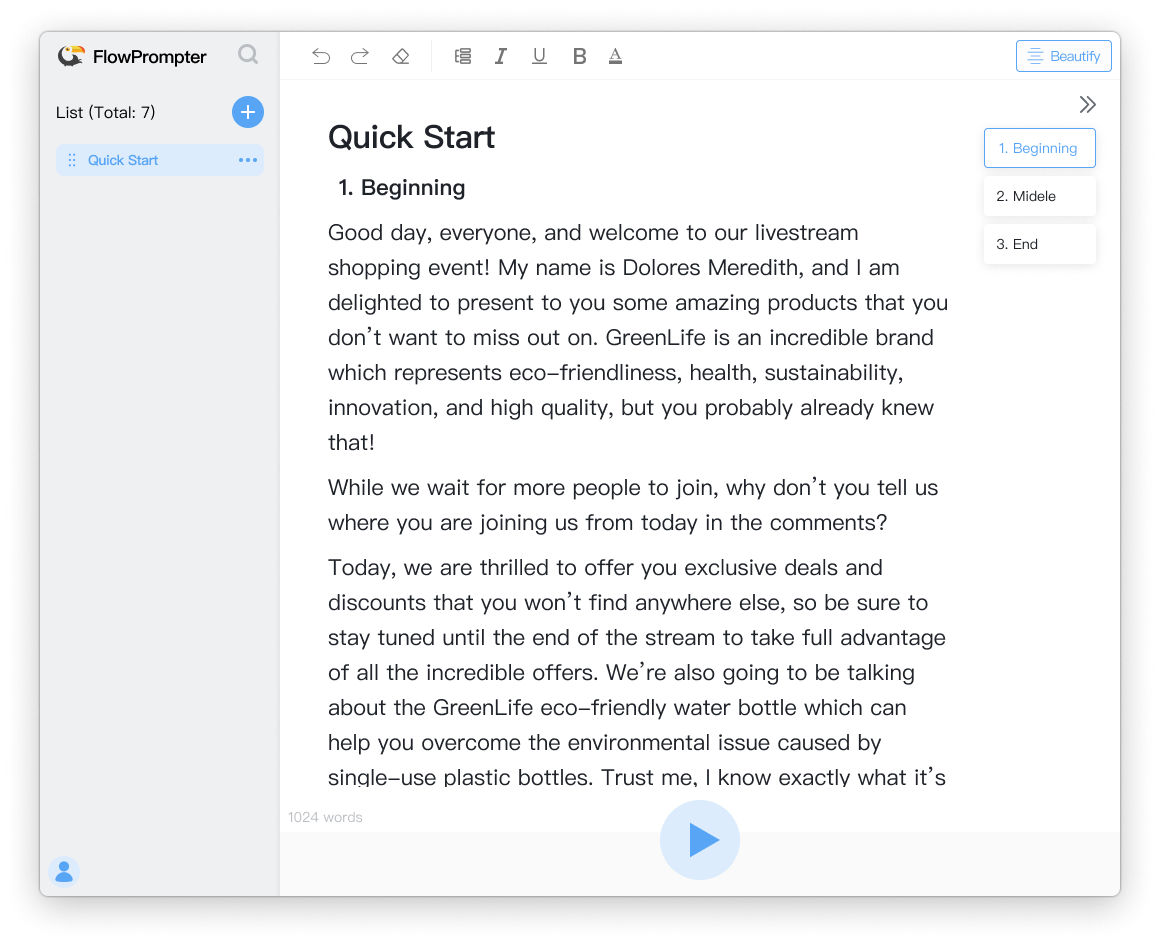
In the fast-paced world of content creation, speed and convenience are everything. That's why more creators are turning to online teleprompters and web-based teleprompter tools instead of traditional software. In this guide, we'll explore why browser-based teleprompters are revolutionizing how you create videos and why FlowPrompter leads the pack.

What is an Online Teleprompter?

An online teleprompter is a web-based tool that displays your script on a screen while you record. Unlike traditional teleprompter software that requires downloading and installation, web-based teleprompters run directly in your browser – no downloads, no installation, no hassle.

Why Choose a Web-Based Teleprompter?

1. Instant Access, Anywhere

The biggest advantage of a web-based teleprompter is accessibility. Simply open your browser, visit the website, and start prompting. Whether you're at home, in a studio, or on location, your teleprompter is always available.

2. Cross-Platform Compatibility

Web-based tools work on any device with a browser – Windows, Mac, iPhone, iPad, Android tablets, you name it. This universal compatibility means your workflow stays consistent regardless of which device you're using.

3. No Software Updates to Worry About

With traditional software, you're constantly dealing with updates, compatibility issues, and storage space. Online teleprompters handle updates automatically in the cloud, ensuring you always have the latest features without lifting a finger.

4. Cloud Sync Across Devices

Start writing your script on your laptop, continue editing on your tablet, and record using your phone – all without manual file transfers. Cloud-based storage keeps your scripts synchronized and accessible wherever you go.

Key Features to Look for in an Online Teleprompter

Mirror Mode

Essential for: Teleprompter glass and beam splitters

Mirror mode flips your text horizontally, allowing you to read the reflection clearly on glass surfaces. This feature is crucial for professional studio setups and anyone using a beam splitter attachment.

[Feature screenshot: Mirror mode in FlowPrompter showing flipped text]

Adjustable Speed Control

Essential for: Different speaking paces and content types

The ability to fine-tune scrolling speed is vital. Slow, steady pacing for tutorials; faster scrolling for energetic content. The best online teleprompters let you adjust speed in real-time during recording.

[Feature screenshot: Speed control slider in FlowPrompter interface]

Responsive Text Sizing

Essential for: Reading comfort and eye contact

Adjustable font sizes ensure text is readable from any distance. Larger fonts for cameras placed further away; smaller fonts for close-up shots. Responsive sizing adapts to different screen sizes automatically.

Script Management

Essential for: Organization and workflow efficiency

Store multiple scripts, organize by project, and quickly switch between them. The ability to save and load scripts keeps your content library organized and ready for spontaneous recording sessions.

[Feature screenshot: Script library/dashboard in FlowPrompter]

FlowPrompter: The Ultimate Web-Based Teleprompter

FlowPrompter stands out as the best online teleprompter for content creators, offering a perfect blend of simplicity and powerful features:

Why Creators Love FlowPrompter

🌐 Completely Web-Based

No downloads, no installations. Just open flowprompter.app and start creating. Works on any device with a browser.

⚡ Lightning-Fast Setup

From script to screen in seconds. Paste your text, adjust settings, and start recording. No complicated configuration required.

🎯 Mirror Mode Built-In

Professional-grade mirror functionality at your fingertips. Perfect for teleprompter glass and beam splitters. Toggle mirror mode with one click.

[Feature screenshot: Mirror toggle button in action]

🎨 Customizable Experience

Adjust font size, scrolling speed, text color, and background color. Create the perfect reading environment for any recording situation.

💾 Cloud-Based Script Storage

Your scripts are automatically saved and synchronized across all your devices. Start on your laptop, continue on your phone, finish on your tablet.

How to Get Started with FlowPrompter

iShot_2026-03-17_14.33.27.png

Step 1: Visit FlowPrompter

Open your browser and go to https://flowprompter.app

Step 2: Prepare Your Script

Type or paste your script directly into the text editor. You can also load a saved script from your library.

Step 3: Customize Settings

Adjust font size, scrolling speed, and enable mirror mode if needed. Make preview adjustments until you're comfortable with the display.

Step 4: Start Recording

Position your device or camera, hit play, and start recording. Adjust speed in real-time as you speak for natural delivery.

Online Teleprompter vs. Traditional Software: The Verdict

Feature

Online Teleprompter

Traditional Software

Installation Required

❌ No

✅ Yes

Cross-Platform

✅ Yes

❌ Usually limited

Cloud Sync

✅ Automatic

❌ Manual

Updates

✅ Automatic

❌ Manual

Storage Space

✅ Zero

❌ Requires disk space

Device Flexibility

✅ Any device

❌ Limited

Perfect For...

🎬 Content Creators & YouTubers

Record professional-looking videos anywhere. No heavy equipment or specialized software needed.

📢 Presenters & Speakers

Deliver smooth, confident speeches and presentations. Maintain eye contact while staying on script.

📱 Social Media Influencers

Create polished Instagram Reels, TikToks, and YouTube Shorts on your phone. The mobile-optimized interface makes it effortless.

🏢 Corporate & Educational

Produce training videos, webinars, and internal communications with professional quality. No need for expensive teleprompter hardware.

🎥 Live Streamers

Keep your live broadcasts on track without juggling notes. Perfect for Q&A sessions, tutorials, and announcements.

Tips for Getting the Most Out of Your Online Teleprompter

1. Position Your Camera Correctly

Place your camera at eye level and position the teleprompter screen slightly below or above. This natural camera angle ensures eye contact feels authentic.

2. Practice Before Recording

Run through your script a few times to get comfortable with the scrolling speed. Adjust settings until the pacing feels natural.

3. Use Mirror Mode for Glass Setups

If you're using a teleprompter glass or beam splitter, enable mirror mode. This ensures text displays correctly when reflected.

4. Break Long Scripts into Sections

For longer content, break your script into manageable sections. Take short breaks between recordings to maintain energy and focus.

5. Keep Your Scripts Concise

Avoid overly wordy scripts. Short, punchy sentences are easier to read and deliver more naturally. Edit for clarity and brevity before recording.

Conclusion

The future of teleprompting is web-based. With the best online teleprompter like FlowPrompter, you get professional-grade features without the hassle of software installation, updates, or device limitations. Whether you're a seasoned content creator or just starting out, FlowPrompter's intuitive interface and powerful capabilities help you deliver your message with confidence.

Ready to transform your content creation workflow? Visit https://flowprompter.app and experience the freedom of web-based teleprompting today. No download required. No account needed. Just start creating.

output-qdzx-jhot.gif