How to Memorize Lines Faster for Videos (Or Why You Should Stop Trying)
You have a script. It is tight, the transitions flow, and the call to action lands. Now comes the part every creator dreads: memorizing it. You read it once. Twice. Ten times. You record yourself on your phone to test recall. You get three lines in and freeze. The word you need is right there on the tip of your tongue, but it will not come out. You start over. And over. Two hours later, you have burned through your energy and your window of good lighting, and you still do not have a clean take.
Here is the truth no one tells beginner creators: trying to memorize scripts is one of the biggest time sinks in video production. The faster path is not a better memorization technique. It is eliminating memorization altogether.
Why Memorizing Scripts Is Slower Than You Think
The internet is full of memorization advice. Write your lines out by hand. Record the other person's lines and leave gaps for yours. Visualize images for each sentence. Use mnemonic devices. These techniques work, and actors have used them for decades. But they all share the same flaw: they treat the symptom, not the disease.
The real problem is that memorization is a sequential process. You cannot skip steps. You cannot speed-read your way to recall. Your brain needs repetition, sleep consolidation, and emotional anchors to lock words into memory. For a 90-second video script, that might take 30 minutes. For a five-minute tutorial, it can take hours. And the moment you deviate from the exact wording, even slightly, your recall breaks and you stumble.
Then there is the performance cost. When you are focused on remembering words, you are not focused on delivery. Your energy goes inward, toward retrieval, instead of outward, toward the audience. Viewers notice. They may not know why, but they sense something is off. The delivery feels mechanical because your brain is working overtime just to produce the next sentence.
What Professional Creators Actually Do
Professional YouTubers, course creators, and webinar hosts do not memorize scripts word for word. They use one of three approaches:
Bullet points and improvisation. They write a loose outline and speak around it. This works for experienced creators who can think on camera, but it risks rambling, missing key points, or running long.
Partial scripting with heavy editing. They script the intro and key transitions, then wing the rest. This saves memorization time but creates inconsistency in energy and structure.
Teleprompters. They keep the full script visible while recording, maintaining eye contact with the lens and delivering with confidence. This is the approach used by news anchors, politicians, and the majority of high-output creators.
The third option is the most efficient for structured content. It preserves the precision of a written script without the time cost of memorization. But it only works if the teleprompter is invisible to the audience and follows the speaker's natural pace.
How a Teleprompter Replaces Memorization
A good teleprompter does not just display text. It removes the entire memorization bottleneck from your workflow. Here is how the time savings break down for a typical five-minute video:
Script writing: Same regardless of approach. 20 minutes.
Memorization: 45 to 90 minutes of repetition, testing, and frustration.
Recording with memorized script: Multiple takes because recall fails under pressure. 30 to 60 minutes.
Recording with a teleprompter: One to three takes because the script is always visible. 15 to 20 minutes.
The math is simple. Memorization adds 45 to 90 minutes of prep time and increases the number of recording takes. A teleprompter eliminates the prep time and reduces takes. For creators who publish weekly, that is hours of reclaimed time every month.
The concern most people raise is delivery quality. They worry that reading from a script will sound robotic. That risk is real, but it is not caused by the teleprompter. It is caused by fixed-speed scrolling that forces the speaker to chase the text. When the teleprompter scrolls at a preset speed, the speaker must either rush to keep up or pause awkwardly while waiting for the next line. The audience hears the mismatch.
The fix is voice-controlled scrolling. When the teleprompter follows the speaker's actual words, the pacing matches naturally. The speaker can pause for emphasis, speed up during an energetic section, or improvise a reaction without losing their place.
How to Deliver Naturally with FlowPrompter
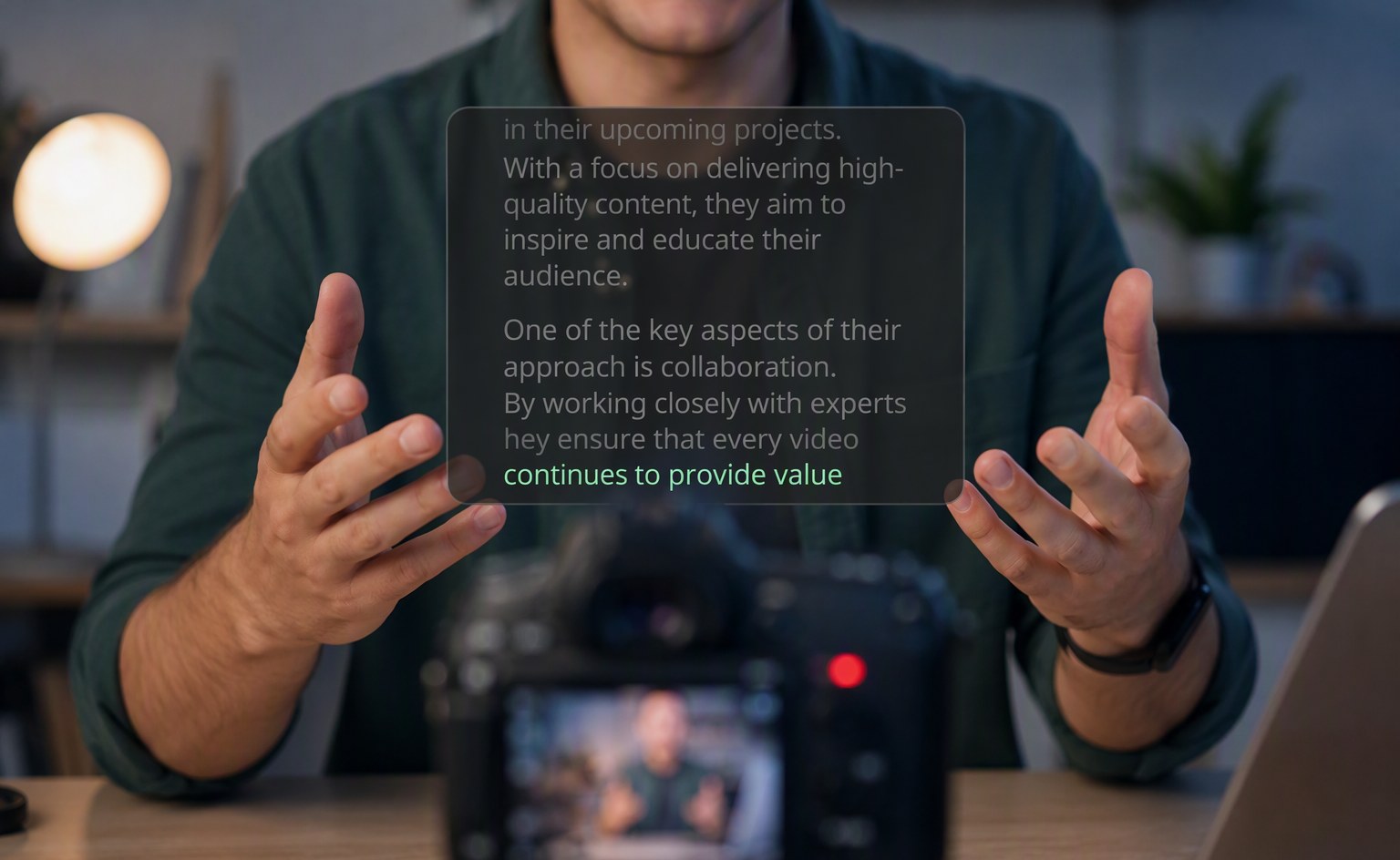
FlowPrompter is a desktop teleprompter for Windows and macOS that runs as an invisible overlay. During screen recordings, Zoom calls, or live streams, your audience never sees it unless you want them to. You toggle visibility with a single switch.
The feature that matters for replacing memorization is AI voice tracking. Instead of scrolling at a fixed speed, FlowPrompter listens to your voice and advances word by word as you speak. If you pause, it waits. If you improvise, it stops until you return to the script. If you speed up, it keeps up. This means you never chase the text. You speak at your natural pace, and the teleprompter follows you.
FlowPrompter supports 14 languages for voice tracking, including English, Spanish, German, French, Portuguese, Dutch, Russian, Japanese, Korean, Chinese, Arabic, Hindi, and Malay. Scripts sync across desktop and mobile, so you can write on your computer and record on your phone without copying and pasting.
FAQ
Will using a teleprompter make me sound like I am reading?
Only if the scroll speed is fixed and you are chasing the text. Voice-controlled scrolling matches your natural pace, so your delivery stays conversational. The key is placing the teleprompter window close to your camera lens so your eye line remains natural.
How much time does a teleprompter actually save?
For a typical five-minute script, memorization takes 45 to 90 minutes. A teleprompter eliminates that entirely. Recording time also drops because you need fewer takes. Most creators save one to two hours per video.
Can I still improvise if I use a teleprompter?
Yes. FlowPrompter's AI voice tracking pauses when you go off-script and resumes when you return. You can ad-lib reactions, answer questions, or add context without losing your place.
Is a teleprompter better than bullet points?
For structured content with specific wording, yes. Bullet points work for loose conversations but risk rambling or missing key points. A teleprompter preserves script precision while freeing you from memorization.
Stop Memorizing. Start Creating.
If you have been searching for ways to memorize lines faster, you are solving the wrong problem. The fastest way to deliver a scripted video is not to memorize it at all. It is to keep the script visible, follow it with your voice, and focus your energy on performance instead of recall.
Try FlowPrompter free today at flowprompter.app and reclaim the hours you have been spending on memorization.