You have a script. You have a camera. And you have a problem: your eyes keep darting down at your laptop screen, and every viewer can tell you're reading. The obvious fix is a teleprompter. But then you Google it and hit a wall. Should you drop $200–$500 on a physical rig with a beamsplitter mirror, or can you get away with a software app on your existing screen?
The answer depends on what you're actually doing. A news studio operator and a solo YouTuber recording in a bedroom have completely different needs. In this guide, we'll break down what hardware teleprompters really deliver, what software solutions can do instead, and how to decide without wasting money on gear you'll never use.
---
What Hardware Teleprompters Actually Give You
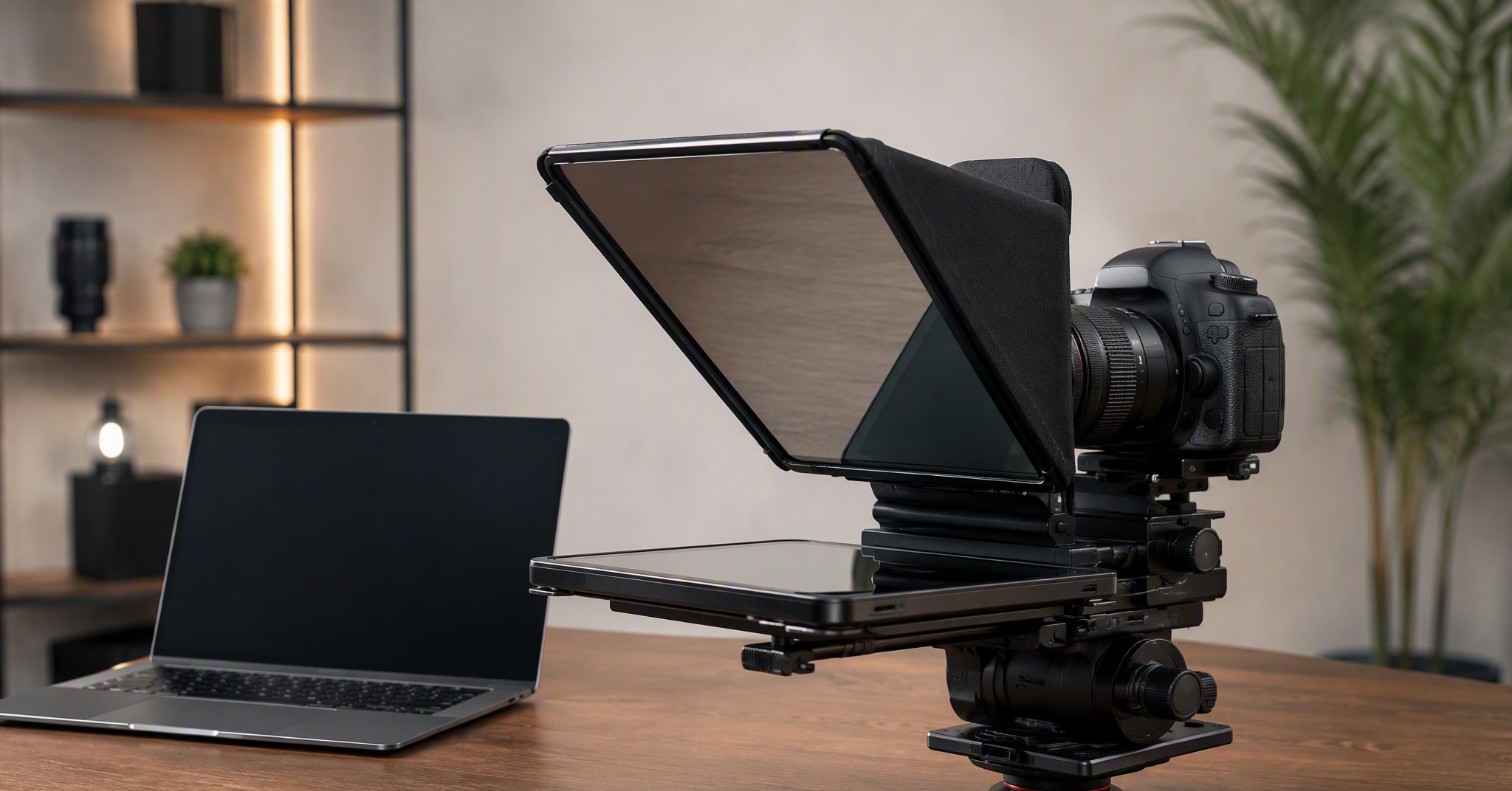
A hardware teleprompter is a physical rig that sits in front of your camera lens. It uses a partially silvered mirror (called a beamsplitter glass) to reflect scrolling text toward your face while remaining invisible to the camera. Popular options range from compact DSLR rigs like the Elgato Prompter (around $300) to professional studio systems from Prompter People that can cost $1,000 or more.
The core advantage is optical. Because the text appears directly over the lens plane, your eye line stays locked on the camera. Viewers perceive this as genuine eye contact, not someone glancing at a monitor. For broadcast studios, live stages, and high-end corporate shoots, this is non-negotiable.
Hardware units also tend to be dedicated. Once set up, they're always ready. You don't need to launch an app, resize windows, or worry about your script accidentally appearing in a screen recording. The mirror does the hiding for you.
But here's what the product pages don't emphasize: hardware rigs add bulk. You need a sturdy tripod, counterbalance weight, and often an external monitor or tablet to drive the text. Setup time is measured in minutes, not seconds. And if you travel or switch between desk recording and on-location shoots, a physical prompter becomes another piece of luggage.
---
What Software Teleprompters Actually Give You

Software teleprompters flip the model. Instead of buying a mirror and frame, you install an app on a device you already own, and the screen itself becomes your prompter. The trade-off is that the text sits beside or below the camera, not directly over it. Your eyes drift slightly off-center, though with practice, most viewers won't notice on a laptop webcam or smartphone recording.
Modern software solutions have closed a lot of gaps. Apps like FlowPrompter run as invisible floating overlays on your desktop, meaning the text stays visible to you but disappears from screen shares, recordings, and screenshots. This solves one of the biggest historical objections to software prompters: the fear that your script will leak into the final video.
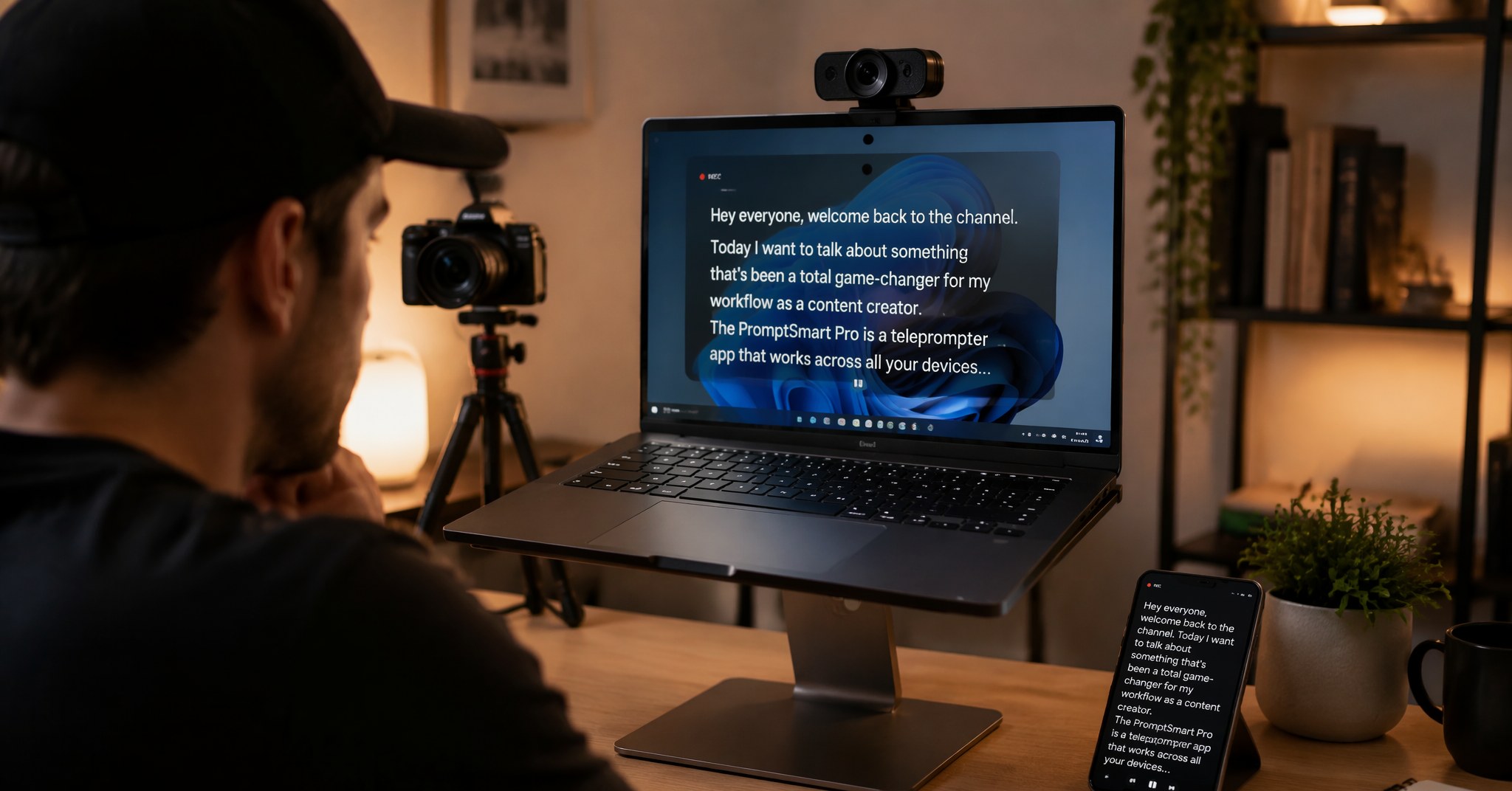
Software also brings capabilities hardware can't match. Voice-activated scrolling lets the text follow your speaking speed automatically, pausing when you improvise and resuming when you return to the script. Multi-device sync means you can draft on your desktop and prompt from your phone. And you can adjust font size, colors, and scroll speed on the fly without disassembling anything.
For creators working across Zoom, Google Meet, Microsoft Teams, OBS, or Loom, a desktop software prompter integrates directly into your existing workflow. No extra cables, no mirror calibration, no compatibility checks with your camera rig.
---
The Real Cost Breakdown (Not Just the Price Tag)
Let's talk numbers honestly.
A decent hardware teleprompter for DSLR or mirrorless cameras starts around $100–$150 for basic tablet-holder rigs. Mid-range units with built-in monitors run $250–$400. Professional systems with large beamsplitter glass, high-brightness displays, and motorized stands easily exceed $800.
But the purchase price isn't the full cost. Add a dedicated monitor or tablet if the rig doesn't include one. Add a heavier tripod because the prompter shifts your center of gravity. Add the time you spend balancing, leveling, and tearing down the rig between shoots. If you record in multiple locations, add transportation and setup friction.
Software teleprompters, by contrast, range from free (browser-based tools like CuePrompter) to premium desktop apps. FlowPrompter, for example, is free to start, with a Plus plan at $9.9 per month if you need advanced voice tracking, multi-device sync, and higher usage limits. Even at the annual rate of $69.9, that's roughly one-third the cost of a mid-range hardware unit, and it keeps working on every device you own.
The hidden cost advantage of software is iteration speed. You can test a script, realize it's too long, edit it, and re-record in the same sitting. With hardware, every tweak means another round of physical setup.
---
When Hardware Makes Sense (And When It Doesn't)
Hardware teleprompters still win in specific scenarios:
Broadcast and live stage work: When a director, producer, and camera operator are all in the room, optical prompters are the standard. The eye-line precision justifies the gear.
Long-form teleprompter use: If you're recording 30–60 minute courses or presentations daily, a dedicated rig saves cumulative setup time.
Multi-camera shoots: When the camera is on a jib, slider, or gimbal, a properly balanced prompter rig stays predictable. Software on a nearby laptop can't match that physical integration.
But hardware is overkill for:
Remote workers on video calls: You don't need a beamsplitter mirror for a 20-minute Zoom presentation. A floating overlay that hides from screen sharing is the practical solution.
Solo creators recording at a desk: If your camera is a webcam or a phone on a stand, adding a prompter rig is like bringing a film crew to a podcast.
Anyone who values portability: Software lives on devices you already carry. Hardware lives in a case.
---
Who Should Stick with Software
If you're a content creator, online course instructor, webinar host, or remote professional who records on a computer, software is almost certainly the right choice. The modern desktop prompter has evolved past the "scroll-only" browser tools of five years ago.
Take voice tracking as an example. Instead of manually adjusting scroll speed or praying your remote control doesn't lag, AI-powered voice tracking listens to your speech and highlights each word as you say it. Pause to think? The text waits. Go off-script to emphasize a point? It stops. Pick up where you left off? It resumes without a button press. This is available in apps like FlowPrompter across 14 languages, not just English.
The "invisible during screen share" feature is another software-exclusive advantage that hardware simply cannot replicate. Since there's no physical mirror between you and the camera, there's nothing for the screen capture to pick up. Your audience sees a clean presentation; you see your script. Toggle the visibility on and off with a switch when you need it.
And if you ever need to prompt from a phone or tablet, software syncs your script across devices instantly. Hardware can't do that without physically moving the tablet from the rig to your hand.
---
FAQ
Can I use a teleprompter without buying any hardware?
Yes. Software teleprompters run on your existing computer, tablet, or phone. For desktop recording and video calls, a floating overlay app like FlowPrompter eliminates the need for a physical beamsplitter mirror entirely. The text stays visible to you and hidden from your audience.
Do software teleprompters work with Zoom and OBS?
Absolutely. Modern desktop prompters are designed to layer over any application. Because they render as invisible overlays, screen capture tools like OBS, Loom, and Zoom's built-in recorder won't capture the text. Your viewers see only you and your shared content.
Is eye contact worse with software than hardware?
Slightly, but context matters. In a close-up webcam shot, the difference between looking at a centered lens and a screen two inches away is minimal. For wide broadcast shots where every degree of eye line is scrutinized, hardware holds an edge. For 90% of online content, software is more than sufficient.
What if I already own a tablet or iPad?
A tablet can serve as the display in a basic hardware rig, but you'll still need a beamsplitter frame and mounting hardware. Alternatively, you can use that same tablet as a standalone prompter with a software app, no mirror required. The second option saves money, space, and setup time.
---
Ready to Ditch the Hardware Guesswork?
You don't need a $300 mirror rig to stop looking down at your notes. If you record from a computer, the right software teleprompter gives you voice-activated scrolling, invisible overlays, and multi-device sync at a fraction of the cost and zero of the bulk.